RiderRev: Stage Plot & Rider
Stage plot, input list and PDF rider in one place, with every revision telling the venue what changed.
One List, Everything Follows
Change a mic or move a channel once. The plot, channel numbers and PDF all update, so the rider never disagrees with itself.
Revisions the Venue Can Read
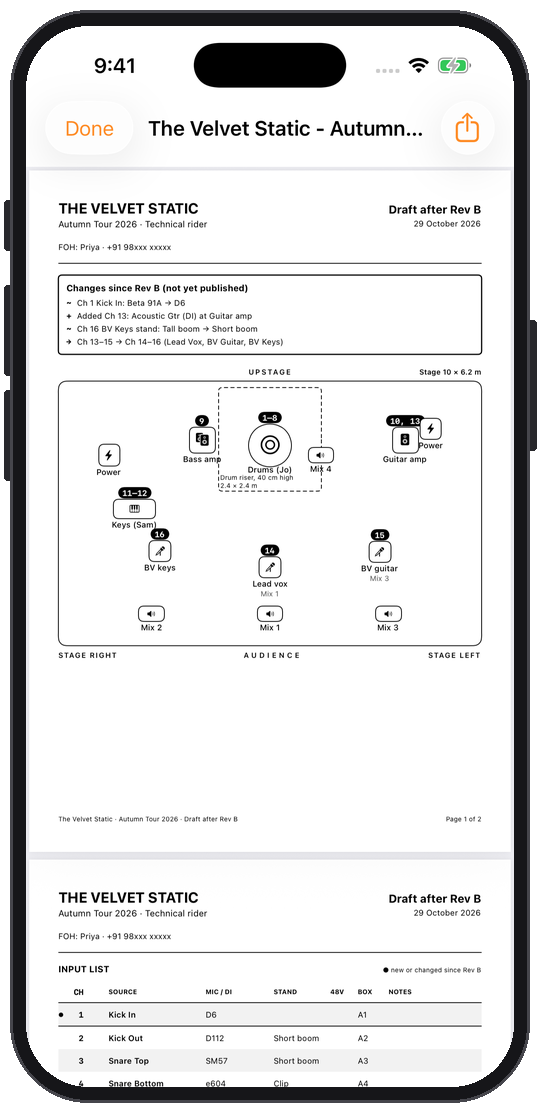
Every published rider gets a letter. The PDF lists what changed since the last one, like "Ch 1 Kick In: Beta 91A → D6", right at the top of page one.
Offline and Private
Riders live on your iPad or iPhone. No account, no cloud, no analytics. It works in a basement venue with no signal.
From last tour's rider to tonight's in minutes.
Build the rider once. After that, each change is a revision.
Build the Input List
Type or paste your channels. Mics, DIs, stands, 48V and stagebox go on one row each.
Place the Stage
Drag amps, wedges, risers and mic positions onto the plot and link them to their channels.
Publish Rev A
Send the venue a clean PDF rider with the plot, input list and monitor mixes.
Change, Publish Rev B
When the band changes, edit the list and publish again. The PDF tells the venue exactly what changed.
An input list that knows live sound
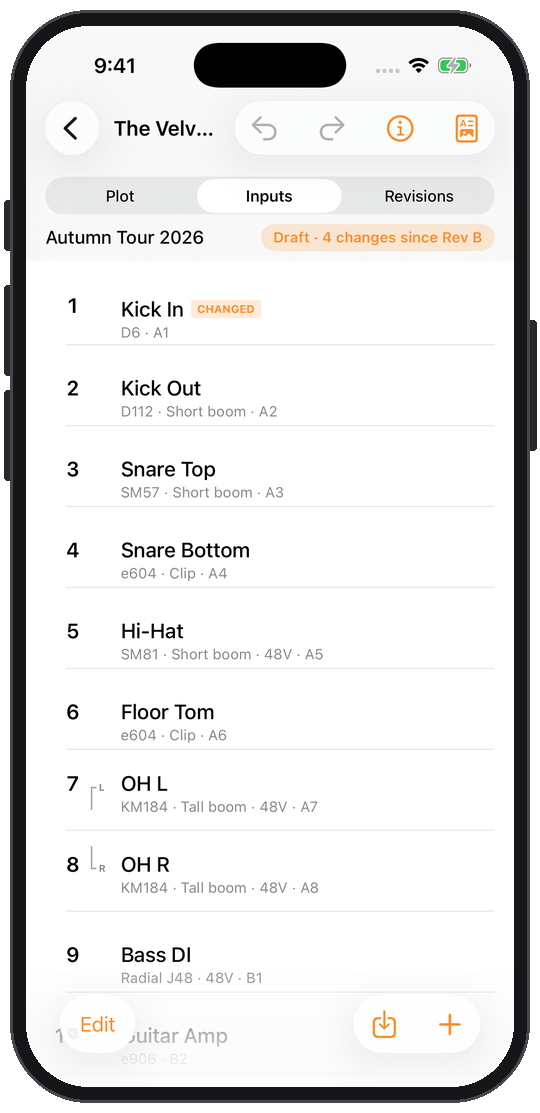
Mic and DI names autocomplete, and 48V switches on by itself for condensers and active DIs. Stereo pairs keep L and R together. Drag to reorder and every channel renumbers. Paste an existing list to start in seconds.
Publish lettered revisions
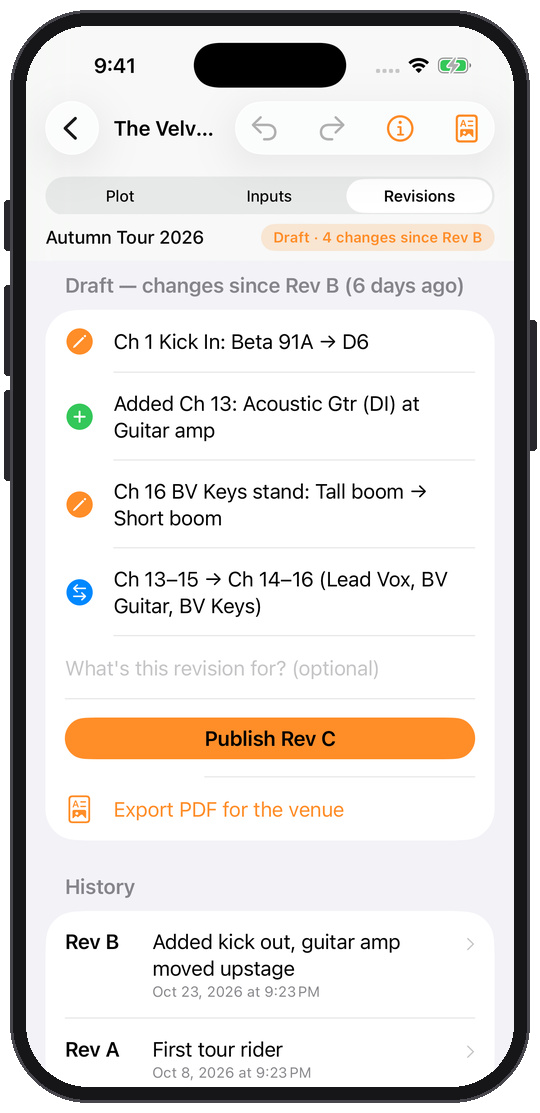
Before you publish, you see every change since the last revision: mics swapped, channels moved, inputs added. Publish and it becomes Rev C, with a note and date you can look back on.
A PDF rider that says what changed
One tap makes an A4 rider: what changed since the last revision, the stage plot, the input list with changed rows marked, and the monitor mixes. Share it by email, Messages or AirDrop.
Why a dedicated tool matters.
Comparing scattered camera rolls and fading paper against an immutable audit record.
Without RiderRev
- A plot in one app and an input list in a spreadsheet
- Channel numbers on the plot that no longer match the list
- "Rider_final_v3_NEW.pdf" and no idea what's new
- House engineers comparing two PDFs line by line
With RiderRev
- One input list behind the plot and the PDF
- Channels renumber everywhere when you reorder
- Lettered revisions with dates and notes
- A "what changed" box at the top of every revised PDF
- Works offline, no account
Simple, honest pricing.
No monthly subscriptions or predatory locking. Start free on the App Store, and unlock lifetime power features with a single one-time upgrade.
Free
Enough for a real rider and its first revision.
- Stage plot, input list and PDF rider
- 2 shows
- Rev A and Rev B on each show, with what changed
- Back up and restore your shows
RiderRev Pro
For engineers and bands whose riders keep changing.
- Unlimited shows
- Unlimited revisions: Rev C, D, E and on
- What changed on every revised PDF
Built for privacy & resilience.
How Audio Immersia structures data, offline performance, and security under the hood.
iPad and iPhone, iOS 17.0 or later
A4 PDF: what changed, stage plot, input list and monitor mixes
Metres or feet for the stage and risers
Stored on your device only; back up to Files whenever you like
No account, no trackers, no analytics SDKs, no data collection
 A NOTE FROM THE STUDIO
 Built by a live sound engineer
We mix shows ourselves, and the rider that changed the week before the gig was always the problem. RiderRev exists so the venue can see what changed without comparing two PDFs by eye.
Product & privacy details.
Who is RiderRev for?
FOH and monitor engineers, bands who keep their own rider, and production managers. Venue engineers who receive riders benefit too: the PDF tells them what changed.
How do revisions work?
Edit your show as much as you like. When it's ready to send, publish it and it becomes the next lettered revision. The PDF for that revision lists everything that changed since the one before.
Do I need an account or internet?
No. RiderRev works fully offline and keeps your riders on your device. You can back up all your shows to a file in Files, and restore them later.
Can I import my existing input list?
Yes. Paste a list from a spreadsheet, a note or an old rider, and RiderRev turns each line into a channel, picking up the mic, stand and 48V where the list has them.
How much does RiderRev cost?
RiderRev is free for 2 shows, with Rev A and Rev B on each. RiderRev Pro adds unlimited shows and revisions for $24.99 a year with a 7-day free trial, or $49.99 once.
Who makes RiderRev?
RiderRev is designed, built and maintained by Audio Immersia LLP.
Download RiderRev: Stage Plot & Rider today.
Engineered for reliability, privacy, and frictionless daily utility.